Meeting notes that stay on your device.

Record any call, get a searchable transcript, clear recap, and follow-up answers in one desktop app. The transcription and chat models download to your device and run locally.

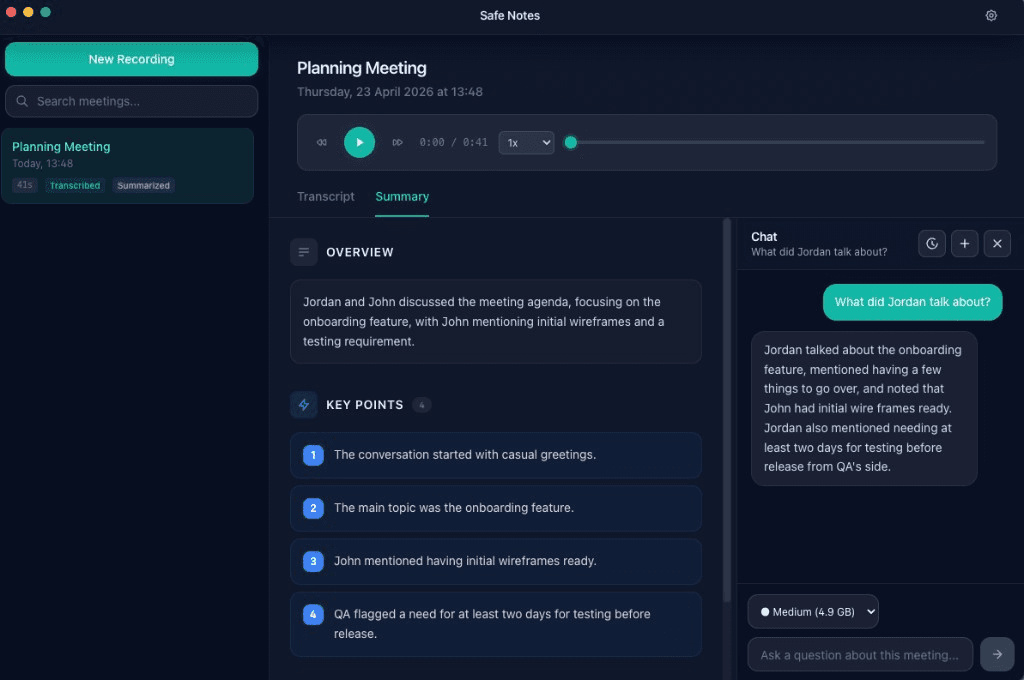
Safe Notes desktop app: meeting summary with local Q&A chat answering a follow-up question about the conversation

Works with any meeting app

  • Zoom
  • Google Meet
  • Microsoft Teams
  • Webex
  • Slack Huddles

Why Safe Notes

The full meeting workflow, kept local.

Private by default

Audio, transcripts, summaries, and chat history stay on your device. No uploads required.

Ask any follow-up

Chat with any meeting and jump to the exact transcript moment behind each answer.

Leave with next steps

Get key points, decisions, and owner-tagged action items after every call.

Search what matters

Find speakers, moments, and exact phrases in seconds.

How it works

Record, transcribe, recap, and ask. All on your device.

Step 01

Record

System + mic audio, dual waveforms, one click.

Step 02

Transcribe

Live transcript with speaker labels and fast search.

Step 03

Summarize & ask

Clear recap, action items, and follow-up answers in one place.

Local by design

The models run on your device. Your meeting data stays there too.

Safe Notes downloads the transcription and chat models to your device and runs them locally. No cloud processing, no hidden upload step.

  • Transcription models download to your device and run locally.
  • Chat and summary models download to your device and run locally.
  • Delete a meeting and its files go with it. No remote copies.

FAQ

Common questions, answered.

  • Yes. Safe Notes keeps meeting audio, transcripts, summaries, and chat history on your device. The transcription and chat models are downloaded to your machine and run locally.
  • Yes. System audio capture works with Zoom, Google Meet, Microsoft Teams, Webex, and other conferencing tools, plus direct microphone recording.
  • Current early access targets macOS (Apple Silicon + Intel) and Windows desktop.
  • No. Safe Notes runs on CPU or Apple Silicon. Faster hardware helps, but it is not required.

Get early access

Get access and install right away.

Enter your email once. We send you straight to the installer. No waitlist queue, no sales call.